Showing posts with label c#. Show all posts

Tuesday, March 11, 2014

MVC with ADO.Net on MySQL (using Stored Procedure)


I am really excited to share this piece of unique code with you. Really this is different MVC without entity framework and based on traditional ADO.Net and database not even MS SQL its MySQL! Yes I am going to share these different type code with all of you.


Before sharing code I would like to tell a brief background about why I have tried it. I have websites all were built on traditional ASP.Net with ADO.Net and now I am trying to migrate these in MVC. But to move everything in MVC at a time will be a big problem, hence I am trying to do it part by part and I believe with ADO.Net MVC will work great. So I do not need to modify database or database access layer. This will reduce my effort and cost.

Next is why MySQL not MS SQL? Reason is, I have small budget for these websites and MS SQL express great for this for now. But in future if I need database more than 10GB or 1GB RAM support for better database operation then MS SQL Express will be a bar for me and paid version is seems very costly according to INR currency. But MySQL enterprise also is free to use and this I am using since last more than 1 year in production on Windows 2008 server without any single problem. About to decide MySQL I get confidence from Google, Facebook, Yahoo etc. companies because so far I know they are all doing their work on MySQL only.

I believe it was a nice explanation about background, now lets come on coding part.

Coding with MySQL is almost similar to MS SQL on .Net part. Just you need to add some reference of MySQL's ADO.Net DLLs and next you need to use MySQL name space in your code. For connection, command, DataAdapter you need to refer MySQL connection, MySQL Command and MySQLDataAdapter. Your calling process and other part will be exactly same. DataTable, DataSet will be same as MS SQL.
In the picture you can see I have added 4 dll files to enable MySQL database access. In MySQL website they share DLLs for specific .Net versions. I am using .Net 4.5 hence I took this files. Files are in source code so for .Net 4.5 you can use these file in your project.


To access MySQL database I have setup my connection string like below:

<add name="connStr" connectionString="server=localhost;user=root;database=world;port=3306;password=****" providerName="MySql.Data.MySqlClient"/>

My project structure as below:


In this screenshot AllCountries.xshtml is my view in Razor format, CountryController.cs is my controller and Contry.cs is my model where I have written my data access code. Its exactly similar like other ADO.Net data access code. 


I am using MySQL's provided database (schema) 'world' for my example. 'world' schema is containing one table 'country' and it is containing data about countries, I am going to use these to show my example. Table structure is very simple and it is as below


To get data from 'country' table I have developed 'GetCountryList' Stored Procedure which I shall call from code.

USE `world`;


DELIMITER $$ 
USE `world`$$ 
CREATE DEFINER=`root`@`localhost` PROCEDURE `GetCountryList`( ) 
  BEGIN  
       select * from world.country; 
  END$$ 
DELIMITER ;

My model class - 'Country.cs' as below:
using System;
using System.Collections.Generic;
using System.Linq;
using System.Web;
using System.Data;
using MySql.Data.MySqlClient;
using System.Configuration;
using System.Web.Security;

namespace World
{
    public class Country
    {
        string connStr;
        MySqlConnection cnn;
        MySqlCommand cmd;
        public Country()
        {
            connStr = ConfigurationManager.ConnectionStrings["connStr"].ToString();
            cnn = new MySqlConnection(connStr);
        }

        public DataTable GetCountryList()
        {
            DataTable dt = new DataTable();
            cmd = new MySqlCommand("GetCountryList");
            cmd.CommandType = CommandType.StoredProcedure;
            cmd.Connection = cnn;

            MySqlDataAdapter adap = new MySqlDataAdapter(cmd);
            if (cnn.State != ConnectionState.Open ||
                cnn.State == ConnectionState.Broken ||
                cnn.State != ConnectionState.Connecting ||
                cnn.State != ConnectionState.Executing ||
                cnn.State != ConnectionState.Fetching)
                try
                {
                    adap.Fill(dt);
                    return dt;
                }
                catch (Exception ex)
                {
                    if (cnn.State != ConnectionState.Closed)
                    {
                        cnn.Close();
                    }
                }
            return dt;
        }
    }   
}

This model class is invoking stored procedure 'GetCountryList' and fetching data from database. Class is completely similar with my earlier project's data access layer class and there has no change, I am using it directly. To show as an example I made is simple with single stored procedure. There has some difference to access MySQL with MS SQL. Look for below codes
using MySql.Data.MySqlClient;

Here I am using MySQLClient which we generally use SqlClient for MS SQL database and declaring MySQL Command, Connection and DataAdapter as below:

MySqlConnection cnn;MySqlCommand cmd;MySqlDataAdapter adap = new MySqlDataAdapter(cmd);


CountryController.cs

Controller class for my project is very simple. This is just creating an object of my country class and invoking method to get data. This method will return a datatable and data table is sending to View.
using System;
using System.Collections.Generic;
using System.Linq;
using System.Web;
using System.Web.Mvc;
using World;
namespace MVC4.Controllers
{
    public class CountryController : Controller
    {
        public ActionResult AllCountries()
        {
            Country countries = new Country();
            return View(countries.GetCountryList());
        }
    }
}

View - AllCountries.cshtml, I am using Razor syntax to populate data in view and this is standalone/complete view without any layout of any other partial views. Code as below:

@{
    Layout = null;
}
<!DOCTYPE html>
<html>
<head>
    <meta name="viewport" content="width=device-width" />
    <title>AllCountries</title>
</head>
<body>
    <div>
        <table border="1" cellpadding="5">
            <thead>
                <tr>
                    @foreach (System.Data.DataColumn col in Model.Columns)
                    {
                        <th>@col.Caption</th>
                    }
                </tr>
            </thead>
            <tbody>
                @foreach (System.Data.DataRow row in Model.Rows)
                {
                    <tr>
                        @foreach (var cell in row.ItemArray)
                        {
                            <td>@cell.ToString()</td>
                        }
                    </tr>
                }
            </tbody>
        </table>
    </div>
</body>
</html>
This is very simple code, Razor code is reading DataTable columns and priting these on html by below code. Razor is nothing new, its just earlier traditional things with new name with an @ sign. 
@foreach (System.Data.DataColumn col in Model.Columns)
{
         <th>@col.Caption</th>
}
This is normal foreach loop to print column caption.
Below code is another foreach loop which is going through each cell and printing these.
@foreach (System.Data.DataRow row in Model.Rows)
{
    <tr>
        @foreach (var cell in row.ItemArray)
        {
            <td>@cell.ToString()</td>
        }
    </tr>
}
After executing these codes, output will show like below.


Thank you for reading my blog. You can download full source code from here.


Tuesday, February 25, 2014

In Memory Search using Lamda Expression: Realtime Chat application on web in ASP.Net: Step 4

Welcome at  Realtime Chat application on web in ASP.Net using SignalR technology. This is step 4 and now we will learn how we can search in memory array without any loop like for, while etc. We will use Lamda expression to search an element in array list with generics. I shall not describe about these technologies from theoretical perspective, here I shall show some application of these. You can read theory of these things from MSDN site.

You may think why this is require for our chat application, really good question. We shall use this technique to find an online user in server. However we can take database help to find online users but to minimize database operation I have used this technique. In chat application I have used a public static list (array) to hold online users, and from here I am searching users to generate online friend lists. By that way I have minimize a lot database operation and this technique can improve your chat application.

Lets check the code first then shall describe the codes.

HTML/ASP.Net part
<%@ Page Language="C#" AutoEventWireup="true" CodeFile="Default.aspx.cs" Inherits="_Default" %>

<!DOCTYPE html>

<html xmlns="http://www.w3.org/1999/xhtml">
<head runat="server">
    <title></title>
</head>
<body>
    <form id="form1" runat="server">
        <h1>In memory search using Lamda Expression in C#.Net</h1>
        <h3>Search country calling code</h3>
        <p>
            Country Name:
            <asp:TextBox ID="TextBox1" runat="server"></asp:TextBox>
&nbsp;<asp:Button ID="Button1" runat="server" OnClick="Button1_Click" Text="Find Calling Code" />
        </p>
        <p>
            <asp:Label ID="Label1" runat="server" Text=""></asp:Label>
        </p>
        <a href="http://en.wikipedia.org/wiki/List_of_country_calling_codes" target="_blank">Full list is available here</a>
    </form>
</body>
</html>
and the C# code as below:

using System;
using System.Collections.Generic;
using System.Linq;
using System.Web;
using System.Web.UI;
using System.Web.UI.WebControls;

public partial class _Default : System.Web.UI.Page
{
   
    protected void Page_Load(object sender, EventArgs e)
    {       
    }
    protected void Button1_Click(object sender, EventArgs e)
    {
        FindCallingCode();
    }
    private void FindCallingCode()
    {
        //In real use databind before searching, using by that way as demo
        List<Country> countries = new List<Country>();
        countries.Add(new Country { callingCode = "+91", name = "India" });
        countries.Add(new Country { callingCode = "+44", name = "UK" });
        countries.Add(new Country { callingCode = "+1", name = "USA" });
        countries.Add(new Country { callingCode = "+88", name = "Bangladesh" });
        countries.Add(new Country { callingCode = "+49", name = "Germany" });
        countries.Add(new Country { callingCode = "+33", name = "France" });
        countries.Add(new Country { callingCode = "+55", name = "Brazil" });

        Country country = countries.FirstOrDefault(x => x.name.ToLower() == TextBox1.Text.Trim().ToLower());
        if (country != null)
            Label1.Text = "Calling code of " + country.name + " is " + country.callingCode;
        else
            Label1.Text = TextBox1.Text + " Not Found in our Country List";
    }
}
public class Country {   
    public string callingCode { get; set; }
    public string name { get; set; }
}
Here is main method is  "FindCallingCode()" and class "Country". Here I am doing all operations. Lets look at some important code.

Country class: This class I have defined to create country objects which will store country name  and calling code. If you need extra properties you can add these easily.

List<Country> countries = new List<Country>();
In the above code I have defined a list (array) of county objects with name countries. Naming convention using as this variable holding multiple country hence its plural name of country.

countries.Add(new Country { callingCode = "+91", name = "India" });
In the above line of code I have adding element of array by creating country class object.

Country country = countries.FirstOrDefault(x => x.name.ToLower() == TextBox1.Text.Trim().ToLower());
This is actually Lamda expression "x=>x.name" this is doing searching operation with method "FirstOrDefault". This line searching all element and doing comparison with user entered country name and stored country name. When matched it will return the country object.
Label1.Text = "Calling code of " + country.name + " is " + country.callingCode;
 In previous line of code we have found country object from array of countries and now getting calling code and name from the found object.

In my chat application I have used mainly this (FirstOrDefault) method and for some cases have used "Count", "Find" methods/properties. "Find" and "FirstOrDefault" both can do a bit similar work but "Find" is very fast (in a blog I found 1000 times) than "FirstOrDefault", hence I am using as and when these are suitable.
For your knowledge you can check other methods as well.

Thanks for reading my blog please visit again for next article.

Source code is available here.

Wednesday, February 19, 2014

Get Server time - Realtime Chat application on web in ASP.Net using SignalR Technology: Step 2

In previous post I have describe how to set up your project for SignalR with require software. Now I shall show to get server time and how can invoke a server method as request and how can get response with server time by calling client javascript method from server end.
Again here will be these main part of coding and here I am not changing anything in Startup.cs file. This code as it is.

using Microsoft.Owin;
using Owin;
[assembly: OwinStartup(typeof(SignalRChat.Startup))]
namespace SignalRChat
{
    public class Startup
    {
        public void Configuration(IAppBuilder app)
        {
            // Any connection or hub wire up and configuration should go here
            app.MapSignalR();
        }
    }
}

Next is ChatHub.cs and here is very small code as below:

using System;
using System.Web;
using Microsoft.AspNet.SignalR;
namespace SignalRChat
{
    public class ChatHub : Hub
    {
        public void getservertime()        {
            Clients.Caller.serverresponse("This is server response. Server is calling client method from server.
Server time is: " + DateTime.Now.ToShortTimeString());
        }
    }
}

Here I have added on public method "getservertime()". Note here I have written all method in small letters and shall call this from client javascript in small letters only. Previously I have tested by writing in capital letters and have seen this is not working. So I would suggest to write these methods always in small letters only, to avoid difficulties.

"getservertime()" is very small method which will invoked by client on button press and this method will invoke a client's javascript method to send response to client. Note here I am writting 'Clients.Caller' to find out the client from where server method has invoked. If I need to call any different client's method (usually for chat application one user will send method to other, so one client will invoke server method and server method will call other client's client method. These things I shall show later) then there will be some different way, which I shall explain later. After 'Client.Caller' method name is coming that is "serverresponse()". This client method is passing argument and this will deliver server message to client.

Next I shall explain about client code and these all are HTML and Javascript only.

<%@ Page Language="C#" AutoEventWireup="true" CodeFile="Default.aspx.cs" Inherits="_Default" %>

<!DOCTYPE html>

<html xmlns="http://www.w3.org/1999/xhtml">
<head runat="server">
   
    <title>SignalR Simple Chat</title>
    <style type="text/css">
        .container {
            background-color: #99CCFF;
            border: thick solid #808080;
            padding: 20px;
            margin: 20px;
        }
    </style>
    <meta http-equiv="X-UA-Compatible" content="IE=edge" />

    <!--Reference the jQuery library. -->
    <script src="Scripts/json2.js"></script>
    <script src="Scripts/jquery-1.10.2.js"></script>
    <script src="Scripts/jquery-1.10.2.min.js"></script>
   
    <!--Reference the SignalR library. -->
    <script src="Scripts/jquery.signalR-2.0.0.js"></script>
    <script src="Scripts/jquery.signalR-2.0.0.min.js"></script>
   
    <!--Reference the autogenerated SignalR hub script. -->
    <script src="/signalr/hubs"></script>
    <!--Add script to update the page and send messages.-->
   
    <script type="text/javascript">
$(function () {
    // Declare a proxy to reference the hub.
    var chat = $.connection.chatHub;


    //Write your server response related code here
    chat.client.serverresponse = function (message) {
        $('#dvServerResponse').append(message);
    };

    // Start the connection.
    $.connection.hub.start().done(function () {
        //Write your server invoke related code here
        $('#btnHello').click(function () {
            console.log('call server');
            chat.server.getservertime();
        });
    });
});
    </script>

</head>
<body>
    <form id="form1" runat="server">
    <div>
<div>
    <div id="dvServerResponse"></div>   
    <input type="button" id="btnHello" value="Get Server Time" />   
</div>
    </div>
    </form>
</body>
</html>

These HTML and Javascript code I have written in ASP.Net file however this will work in normal HTML file as well.
Initial part is javascript library file referencing section. Here I am calling files in three steps, first JSON and JQeury files, next SignalR library and finally Hub files. Next starting custom java script codes.

In java script code firstly I have created a proxy of chatHub. Next code is

//Write your server response related code here
    chat.client.serverresponse = function (message) {
        $('#dvServerResponse').append(message);
    };

For time being you can assume this is standard syntax of creating client methods which will be called from server and within this cal implement client activities. For my case I am appending server response at div.

Other part of client codes as below

//Write your server invoke related code here
$('#btnHello').click(function () {
    console.log('call server');
    chat.server.getservertime();
});

This method will start executing once btnHello clicked and it will invoke server method to get server response. Here to invoke server method syntax like "chat.server.getservertime()" or "proxy-object.server.server-method()".

Finally result will displayed in client browser.

Here is the full code.

Thanks for reading my blog.


Saturday, November 16, 2013

JQuery-AJAX: Change a HTML control name from server


I want to share a very basic and simple but a bit advance sample code on ASP.Net Ajax using JSON and JQuery. Now I want to change a control name or text based on server response data.

To demonstrate this thing I shall change my clicked button name based on server. This type of sample code is very easy to learn and you can use similar concept to develop solution for lots of requirement. Say you are developing some code where you have a button to 'Like' but after clicking on it the button  name will change to 'Unlike', or in a social network one user will start following some group or person; so when user will click on 'Follow' button will be changed to 'Following' etc.
Lets have a look in to the code:

HTML for this solution as below -
in put id="btnClick" type="button" value="Click Me!"

Here button 'btnClick' text will be changed. Next look into the back-end C# code.


[WebMethod]
public static string ChangeButtonNameJQuery(string btnName)
{     
      return btnName+ " - changed from Server";
}


Very simple Web Method or WebService in page 'ChangeButtonName.aspx'. To declare a page method as WebService we need to use namespace 'System.Web.Services', which I have used in using namespace section. Besure this method is 'static' type and its 'public'. Return type of webservice is string and invoking with one string parameter 'btnName'.

Now look at the jQuery code.


"js/jquery-1.9.1.js">
"text/javascript">
      $(document).ready(function () {
            $("#btnClick").click(function () {               
                
                $.ajax({
                    type: "POST",
                    url: "ChangeButtonName.aspx/ChangeButtonNameJQuery",
                    data: JSON.stringify({ btnName: $("#btnClick").val() }),
                    contentType: "application/json; charset=utf-8",
                    dataType: "json",
                    success: function (msg) {                       
                        $("#btnClick").val(msg.d);                       
                    }
                });
            });
        });

I have used here Jquery version 1.9.1 and calling my method when document becomes ready to execute which will call just after loading completion of page.


$(document).ready(function ()
{
}

the above code is doing this thing (to know details about Jquery Ajax calling from ASP.Net, read my 1st post on Jquery-Ajax). In my present code We are calling web method 'ChangeButtonNameJQuery' from current page (ChangeButtonName.aspx/ChangeButtonNameJQuery). Once successful web method execution client browser is getting response and invoking method 'success:' with response in object 'msg'. We can access server response from 'msg' property 'd' by using 'msg.d' and that I am setting to change button value, by


$("#btnClick").val(msg.d);

I hope you have enjoyed this post and has helped to learn little more on ASP.Net ajax using JQuery. Continue reading my next blog post to know more on Ajax using JQuery.

Thank you for visiting my blog. Happy coding.

Wednesday, November 13, 2013

JQuery-AJAX:Pass two parameters and concatenate two string at server side with ASP.Net

[Original Post from my another blog] - visit it for better design and reading friendly.

This is advance article of my previous post on JQuery-AJAX in ASP.Net JQuery-AJAX: Get Server Time using jQuery AJAX in ASP.Net. In earlier post I have describe how to get server time using ASP.Net with Jquery ajax technology. How I shall describe little bit advance things, that is how to pass two parameter from client and catch these values in server then concatenate in server and response result to client to show it.

Step 1: As previous declare a webmethod or webservice at backend.

[WebMethod]
    public static string ConcateName(string fname,string lname)
    {
        return fname +" "+lname;
    }

Note here I have passed two parameter with name 'fnale' and 'lname'. In JQuery you have to invoke method with exactly same name of parameter otherwise code will not run.

Step 2: Declare HTML control, tow text box, a button and a DIV to show server response. (visit my primary blog for better view of HTML and JQuery).

For 'First Name' input HTML id="txtFName" type="text".
Last Name: input id="txtLName" type="text" and a button.    
with id="btnClick" type="button" value="Concat Name".
And response in a DIV with id="dvResponse".

 Step 3: Write JQuery code in ASPX page as below:

        $(document).ready(function () {
            $("#btnClick").click(function () {
                //alert($("#txtFName").val());
                $.ajax({
                    type: "POST",
                    url: "ConcatName.aspx/ConcateName",
                    data: JSON.stringify({ fname: $("#txtFName").val(), lname:$("#txtLName").val() }),
                    contentType: "application/json; charset=utf-8",
                    dataType: "json",
                    success: function (msg) {
                        $("#dvResponse").append(msg.d+"
"
);
                        //$("#dvResponse").html(msg.d);
                    }
                });
            });
        });
    
 Note here most important two lines as below:

url: "ConcatName.aspx/ConcateName",
data: JSON.stringify({ fname: $("#txtFName").val(), lname:$("#txtLName").val() }),


First line is describing which WebService should invoke and next line the parameter for webservice. Note here I have mentioned exactly same name of WebService parameter.

When you will run this code and type value in two text box and then click on button, browser will invoke server WebService and concatenate two name and then response to server. Which will catch by JQuery ajax part and result will be shown in DIV 'dvResponse'.
How you have enjoyed my post and it has helped for your learning on JQuery AJAX technology in ASP.Net-C#.

Tuesday, November 5, 2013

JQuery-AJAX: Get Server Time using jQuery AJAX in ASP.Net

[Original post from my blog http://onlyms.net//]

Friends, Now I want to share my codes with on ASP.Net AJAX by using jQuery. Earlier I have worked with UpdatePanel for AJAX work but it seems to this is not the best approach however its most easiest and simplest way for AJAX. So when you do not need maximum performance then definitely you can consider it to save time. But if you need maximum performance then my recommendation always jQuery AJAX. I shall share my blog post for AJAX work using jQuery and JSON with ASP.Net and C# with sample code which will help reader to learn this technology very easily.

In my first post I shall show how to get server time using jQuery with AJAX that means without page post back.


Step 1: Create a WebService which will response to client to inform server time. WebService as below:

using System;
using System.Collections.Generic;
using System.Linq;
using System.Web;
using System.Web.UI;
using System.Web.UI.WebControls;
using System.Web.Services;
public partial class GetTime : System.Web.UI.Page
{
    protected void Page_Load(object sender, EventArgs e)
    {
    }

    [WebMethod]
    public static string GetDate()
    {
        string str="[Response from Webservice]
Current Server Time is: "+ DateTime.Now.ToString() + "." + DateTime.Now.Millisecond.ToString();
        return str;
    }   
}

Nothing more require at back-end now I shall show at front end part of code.Full back-end code as below:
Note to declare a WebService first we have use namespace 'using System.Web.Services;' and then have declared method as '[WebMethod]'

Step 2: Declare a HTML button for clicking and a DIV to show server response.

Step 3: Set jQuery Part. Here first need to link jquery code which I am using version jquery-1.9.1.js and I have placed at my project at js folder. 

Step 4: Write jQuery code to access WebService. First look into the code next I am trying to clarify about these code.

JavaScript Script as below:
        $(document).ready(function () {
            $("#btGetDate").click(function () {               
                $.ajax({
                    type: "POST",
                    url: "GetserverTime.aspx/GetDate",
                    data: "{}",
                    contentType: "application/json; charset=utf-8",
                    dataType: "json",
                    success: function (msg) {                       
                        $("#dvDate").html(msg.d );
                    }
                });
            });
        });
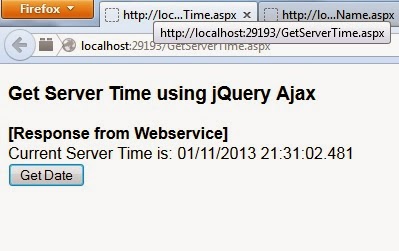
This code will be activated when document becomes ready and when we will click on button 'btnGetDate' these next code will start execution using AJAX technology. Its sever calling type will be 'POST' and it will try to invoke 'GetDate' webservice will has created under 'GetserverTime.aspx' page and it's type will be JSON as describe next line.Once server response will receive successfully this code will go for next section 'success:function...' and jQuery will set server response at our declared DIV element 'dvDate'. From next post I shall not mention jQuery AJAX declaration in so detail and will discuss on main section only. Server response will show like below screenshot:

Get full source code with better alignment of blog from my blog.

Sunday, August 4, 2013

Lossless Image Compression in C#.Net and VB.Net

Last time I shared C# code which can resize an image with desired size by keeping same Height vs. Width ratio. Now I am going to share next step of image processing code, which can compress an image without (almost) losing it quality. 

Usually an image which you may have taken from one 10 Mega pixel digital camera generates image around 5MB file size. To store same size in webserver and showing it in user’s desktop will slowdown users website browsing experience. For that reason now all website especially photo sharing and social network websites, like facebook.com or google plus etc. compress these images in smaller file size without losing image quality and store in webserver. This technique saves webserver storage and saves network bandwidth when user opens these.

Here I am sharing one method which has written in C# and VB.Net code (base code found somewhere in google then I updated as I need). This method can invoke by just one single line of code and can get compressed image.


How can I use this code in my application?


To use/invoke this method:

CompressJPEGImage(Bitmap Image, Image Name With Full Path)

To use this method you need to create an object of the class where you will define this method and then need call it with parameters ‘image object’ and ‘image full name with path’ where compressed will be saved. On successful compression this method will return 'true' else 'false'.

In my application I have written two overload methods to save the compress image and sometimes to get compressed image object as a return of the method as based on my requirement. 

Full code in C#.Net as below:

  public bool CompressJPEGImage(Bitmap bmp1, string tempImgNameWithPath)

    {
        ImageCodecInfo jgpEncoder = GetEncoder(ImageFormat.Jpeg);

        // for the Quality parameter category.
        System.Drawing.Imaging.Encoder myEncoder = System.Drawing.Imaging.Encoder.Quality;

        EncoderParameters myEncoderParameters = new EncoderParameters(1);
        EncoderParameter myEncoderParameter = new EncoderParameter(myEncoder, 75L);
        myEncoderParameters.Param[0] = myEncoderParameter;
        try
        {
            bmp1.Save(tempImgNameWithPath, jgpEncoder, myEncoderParameters);
            return true;
        }
        catch (Exception)
        {
            return false;
        }
    }

Full code in VB.Net as below:

Public Function CompressJPEGImage(bmp1 As Bitmap, tempImgNameWithPath As String) As Boolean
 Dim jgpEncoder As ImageCodecInfo = GetEncoder(ImageFormat.Jpeg)

 ' for the Quality parameter category.
 Dim myEncoder As System.Drawing.Imaging.Encoder = System.Drawing.Imaging.Encoder.Quality

 Dim myEncoderParameters As New EncoderParameters(1)
 Dim myEncoderParameter As New EncoderParameter(myEncoder, 75L)
 myEncoderParameters.Param(0) = myEncoderParameter
 Try
  bmp1.Save(tempImgNameWithPath, jgpEncoder, myEncoderParameters)
  Return True
 Catch generatedExceptionName As Exception
  Return False
 End Try
End Function


How can I change image quality and generated size based on my requirement?

For my application I have compressed 75% (75L) but you can change it as per your requirement. If you increase this value then file size and image quality both will increase. Run this code with different parameter value and get image as per your requirement.

Thanks for reading my blog I hope this code will help you to write code.

Sunday, July 28, 2013

Lossless image resize in C# by keeping same aspect ratio.

Now I am developing an image sharing and Indian social network application (www.Alap.Me) where I need to resize image (JPG for my case). This is a very common situation to all coders and it helps us if we get some readymade method which can serve our purpose. I found basic code of this somewhere from Google and later I modified it as I need and finally developed this code.
This code can resize any image by keeping aspect ratio, so your image always will be same in width vs. height ratio.

How to use it?


This is very easy to use this code; just you need to call it with image file name with full path and maximum height and width. My code automatically detects height or width, which is maximum at your parameter and based on this, code will set another parameter based on aspect ratio and finally resize your image.

ResizeImage(fileLocationWithName, maxWidth, maxHeight);

Complete Code in C#.Net


   public Bitmap ResizeImage(string fileNameWithPath, int maxWidth, int maxHeight)
    {        
        FileStream stream = new FileStream(fileNameWithPath, FileMode.Open);
        Stream streamImage = (Stream)stream;
        Bitmap originalImage = new Bitmap(streamImage);
        int newWidth = originalImage.Width;
        int newHeight = originalImage.Height;
        double aspectRatio = (double)originalImage.Width / (double)originalImage.Height;
         if (aspectRatio > 1 && originalImage.Width > maxWidth)
        {            
            newWidth = maxWidth;            newHeight = (int)Math.Round(newWidth / aspectRatio);
        }        
        else 
            if (aspectRatio <= 1 && originalImage.Height > maxHeight)
            {            
                newHeight = maxHeight;            newWidth = (int)Math.Round(newHeight * aspectRatio);
            }         
        Bitmap newImage = new Bitmap(originalImage, newWidth, newHeight);
        Graphics g = Graphics.FromImage(newImage);
        g.InterpolationMode = System.Drawing.Drawing2D.InterpolationMode.HighQualityBilinear;

        g.DrawImage(originalImage, 0, 0, newImage.Width, newImage.Height);         

        originalImage.Dispose();        
        stream.Close();        
        stream.Dispose();        
        return newImage;
    }


Complete code in VB.Net:

Public Function ResizeImage(fileNameWithPath As String, maxWidth As Integer, maxHeight As Integer) As Bitmap
 Dim stream As New FileStream(fileNameWithPath, FileMode.Open)
 Dim streamImage As Stream = DirectCast(stream, Stream)
 Dim originalImage As New Bitmap(streamImage)
 Dim newWidth As Integer = originalImage.Width
 Dim newHeight As Integer = originalImage.Height
 Dim aspectRatio As Double = CDbl(originalImage.Width) / CDbl(originalImage.Height)

 If aspectRatio > 1 AndAlso originalImage.Width > maxWidth Then
  newWidth = maxWidth
  newHeight = CInt(Math.Round(newWidth / aspectRatio))
 ElseIf aspectRatio <= 1 AndAlso originalImage.Height > maxHeight Then
  newHeight = maxHeight
  newWidth = CInt(Math.Round(newHeight * aspectRatio))
 End If

 Dim newImage As New Bitmap(originalImage, newWidth, newHeight)

 Dim g As Graphics = Graphics.FromImage(newImage)
 g.InterpolationMode = System.Drawing.Drawing2D.InterpolationMode.HighQualityBilinear
 g.DrawImage(originalImage, 0, 0, newImage.Width, newImage.Height)

 originalImage.Dispose()
 stream.Close()
 stream.Dispose()

 Return newImage
End Function

I have compressed attached picture by using my code and see here difference.
This is after re-size (around 30KB)


This is original size photo (around 5MB)


I hope this will help you to make easier your coding. Thank you for reading my blog.